
PyTorch is a machine learning and deep learning framework that provides tools for building and training neural networks. It’s designed for ease of use, flexibility, and support for modern compute hardware such as GPUs. PyTorch uses dynamic computation graphs, which makes development intuitive and well-suited for rapid experimentation.
PyTorch and AI
PyTorch integrates seamlessly with Python, making it approachable even for beginners. Thanks to its popularity and active community, PyTorch offers extensive resources, strong community support, and many real-world examples.
PyTorch provides native GPU acceleration, which can dramatically speed up processing for large datasets. In many cases, enabling GPU usage requires only minimal changes to your code.
Installing PyTorch
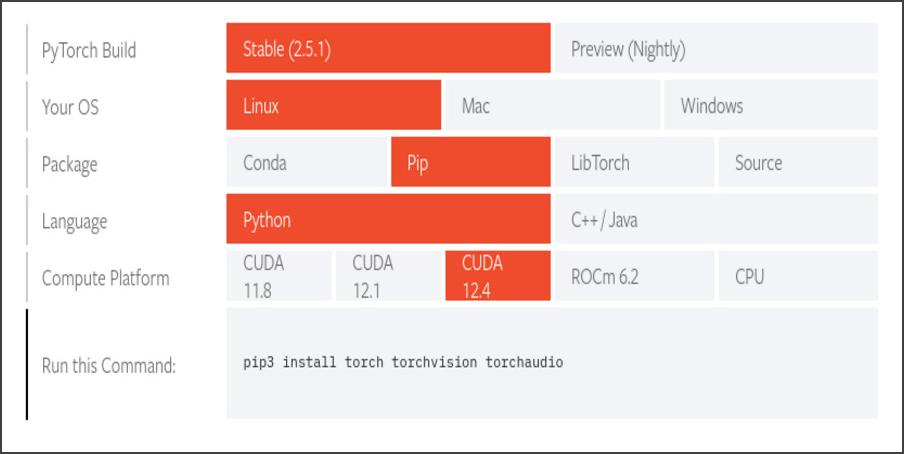
Installing PyTorch is easier than it looks. On the official PyTorch website, you’ll find a convenient installer configurator that helps you choose the right options for your system—such as your operating system, CUDA version, and package manager.
- Go to the official PyTorch website.
- In the “Get Started” section, select your operating system (Linux, Windows, macOS).
- Choose your CUDA version or the CPU-only option.
- The site will automatically generate the install command for you.
For example, on Linux with CUDA 12.4, the command may look like this:
pip3 install torch torchvision torchaudio
Next, create a test.py file and paste the following code:
import torch
print(torch.__version__)
If the PyTorch version prints without errors, the installation was successful!